Administering the static IP address
NOTE: Make sure you have the password before proceeding. Refer to the filled-out job aid entitled Pre-Installation Network Planning Forms--S8700 Media Server. for more information.
- Connect the services laptop computer to the top port on the IPSI circuit pack faceplate.
- From the services laptop Start Menu, click Start > Run to open the Run dialog box.
- Type command and press Enter to open a MSDOS Command Line window.
- Type arp -d 192.11.13.6 and press Enter to clear the ARP cache in the laptop. This command will respond with one of the following:
- The command line prompt when the cache has been cleared.
- The phrase: The specified entry was not found. This is returned when the specified IP address does not currently contain an entry in the ARP cache.
- Type telnet 192.11.13.6 and press Enter to open the Telnet window and connect to the IPSI
Prompt = [IPSI]:
NOTE: While connected to the IPSI, type help or ? to obtain online help. Most commands have two or three letter abbreviations.
- Type ipsilogin and press Enter.
NOTE: The password is not the same as that used for logging into the media servers.
- Log in as craft.
Prompt = [IPADMIN]:
- Type set control interface ipaddr netmask, where ipaddr is the customer-provided IP address and netmask is the customer provided subnet mask. �
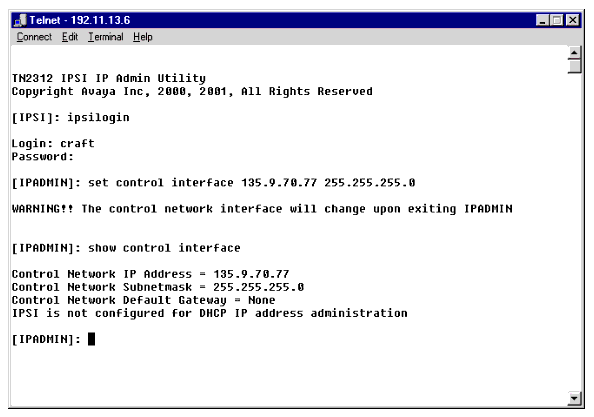
- Press Enter to effect the changes.
- Type set control gateway gateway, where gateway is the customer-provided IP address for their gateway.
- Press Enter to effect the changes.
- If required use the setvlanpri, setvlanid, and setdiffserv commands to enter VLAN and diffserv parameters for the IPSI. Use the help command to obtain syntax guidelines for these commands.
- Type quit to logoff the IPSI.
NOTE: Control network settings (IP address, subnet mask, and gateway) become effective when you exit the IPADMIN session.
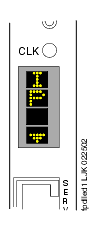
- Check the LCD. Verify that it has an I P with a filled-in V showing at the bottom. (See LED display showing that the IPSI has a static IP address)
LED display showing that the IPSI has a static IP address��
- Disconnect the laptop from the faceplate.
NOTE: If necessary, use the arp -d 192.11.13.6 command (step 4) to clear the ARP cache on the laptop before connecting to another IPSI. If the cache is not cleared the laptop appears to hang and does not connect to the next IPSI.
- Repeat for each IPSI circuit pack.

