Continue Server 1 configuration
- Under Server Configuration and Upgrades click Configure Server to restart the configure server process. If a software upgrade was not performed continue on with the next step.
- Click through the Review Notices to get to the Select method for configuring server page.
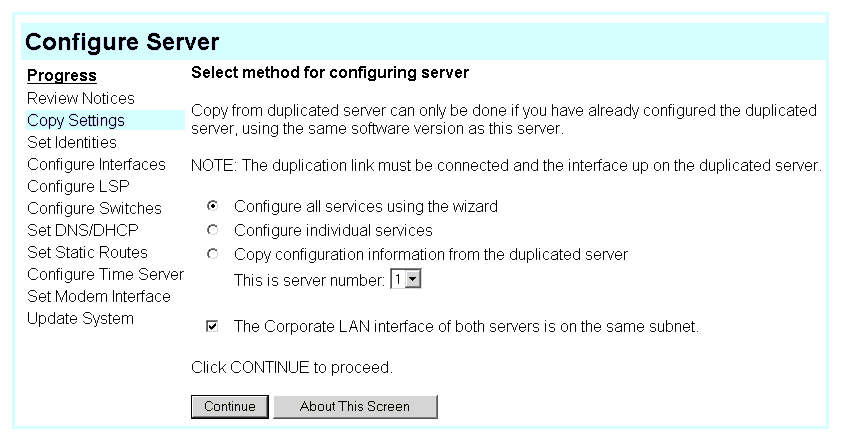
- Select "Configure all services using the wizard." and click Continue to get to the Set Server Identities: page. ��
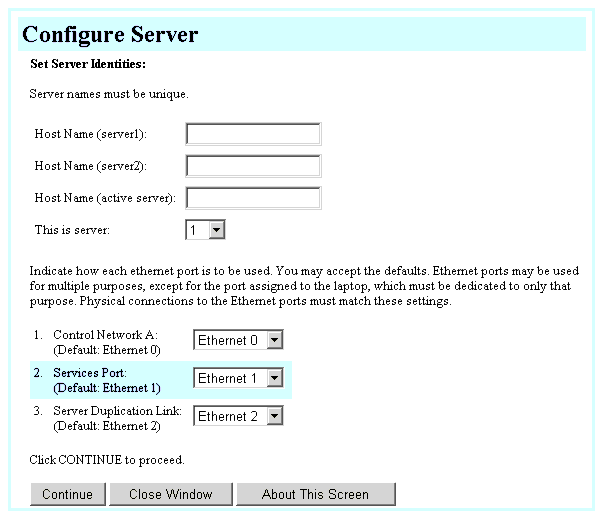
��
NOTE: Most of the fields are populated with default settings. Do not change the defaults unless the customer's network administrator requests it (refer to the filled-out job aid entitled Pre-Installation Network Planning Forms--S8700 Media Server).
- Fill in the fields on this and the subsequent pages:
- Configure Interfaces
- Configure LSP
- Configure Switches
- Set DNS/DHCP
- Set Static Routes
- Configure Time Server
- Set Modem Interface
- Update System
NOTE: The media server is not configured until you click Continue on the Update System page.
- When you get to the Configure Local Survivable Processor page, select "This is NOT a local survivable processor." (default setting) and click Continue.
- When you complete all the fields, click Continue on the Update System screen. The Update System screen displays each configuration task as it completes it. The last line says "System modifications completed."

