DS1 Tie Trunks Using T1 Channel Service Unit
The T1 Channel Service Unit (CSU) interfaces the DS1 tie trunks with the 1.544 megabits per second digital facility.
Connect the DS1 tie trunk to a T1 CSU. See Typical Connections to Channel Service Unit.
NOTE: A 3150 CSU is shown, a 120A Integrated CSU (ICSU) may be used.
Contact your Avaya representative for maximum cabling distances for the 3127 series CSU or the 120A ICSU.
Typical Connections to Channel Service Unit���
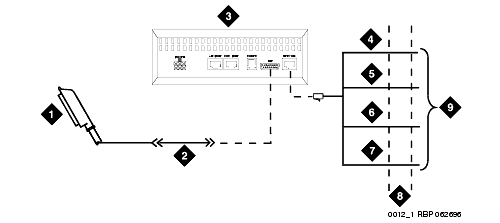
Figure notes
1 Connector to DS1 Interface Circuit Pack
2 C6C Cable (For Distances Over 50 ft (15�m), Use C6E Cable(s))
3 T1 Channel Service Unit (CSU) 3150 Shown
|
8 1.544 Mbps Digital Service Interface
|
DS1 Cables �
| Connector Cable |
Description and Usage |
| C6C connector cable |
50-ft (15 m) shielded cable equipped with a 50-pin male connector on one end and a 15-pin male connector on the other end. Use this cable to connect a DS1 tie trunk circuit pack to a Channel Service Unit (CSU). |
| C6D connector cable |
50-ft (15 m) shielded cable equipped with a 50-pin male connector on each end. Use this cable to connect a DS1 tie trunks in collocated cabinets. |
| C6E connector cable |
100-ft (31 m) shielded cable equipped with a 50-pin male connector on one end and a 50-pin female connector on the other end. Use this cable as an "extension" cable between the DS1 tie trunk circuit pack and other connector cables. |
| C6F connector cable |
50-ft (15 m) shielded cable equipped with a 50-pin male connector on one end and a 3 in. (8 cm) stub on the other end. Use this cable to connect the DS1 tie trunk circuit pack to channel multiplexers requiring hardwired connections. |
Pinout of C6F Cable �
| Wire Color |
Lead Designation |
Pin Number |
| White/Green |
LI* (High Side) |
47 |
| Green |
LI |
22 |
| White/Brown |
LO |
48 |
| Brown |
LO* (High Side) |
23 |
| White/Slate |
LBACK2 |
49 |
| Slate |
LBACK1 |
24 |

