

|
|
|
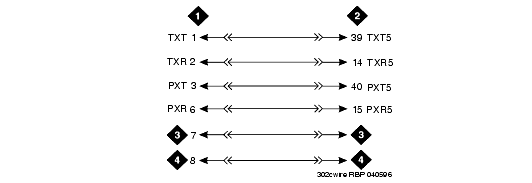
The 302D Enhanced Attendant Console is used to describe a telephone connection typically used with the 84xx (4-wire) telephones.
The 302D does not require auxiliary power unless it has a 26C1 DXS console or Vacuum Fluorescent Display. The 302D attendant console always requires auxiliary (adjunct) power (-48 VDC). Power is connected to the console through Pins 7 and 8 of the information outlet. Only three consoles can be powered by the media gateway. When possible, the primary console should be powered from the media gateway so it has the same power failure backup as the media gateway.
The maximum cabling distance for the console powered from the media gateway is 350 feet (100 meters).
The general steps to connect a telephone are:
CAUTION: Do not use the 329A power unit for the attendant console. Use an 1151A1, 1151A2, 1145A, or MSP-1 power unit.
|
|
|