

|
|
|
After you have installed the hardware, to support an FTP session you must administer and test the installation.
Use Avaya Site Administration for this administration.
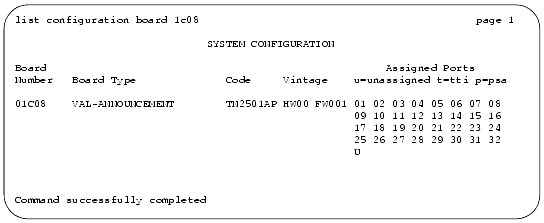
The System Configuration report appears. Use this report to ensure that the MultiVantage software recognizes the TN2501AP circuit pack after it is latched in the carrier slot.
The IP Node Names screen appears. Use this screen to administer the circuit pack's node name.
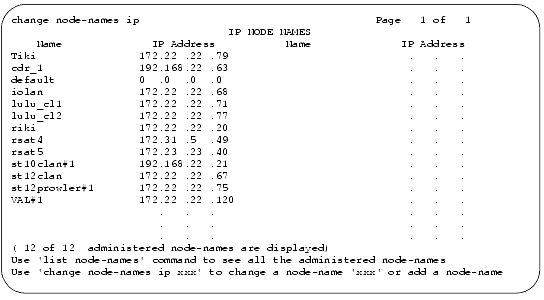
This name is recognized only within the MultiVantage software and does not need to match the node name on your network.
Get this information from the network administrator or refer to the filled-out job aid entitled Pre-Installation Network Planning Forms--S8700 Media Server.
The IP Interfaces screen appears. Use this screen to administer an IP interface, which associates the circuit pack with an IP address.
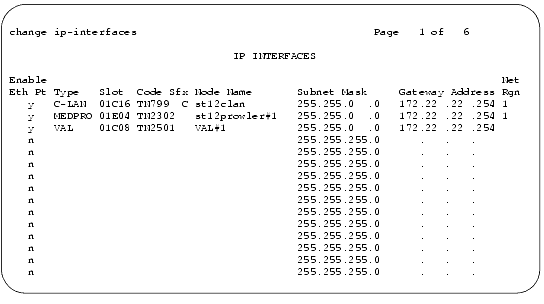
If a TN2501AP circuit pack is not at this location when you submit the screen, the software prompts you to enter a VAL circuit pack location.
If you press Help, a list of administered node names appears (including the name you administered with the change node-names ip command), and you can select from the list.
Gateway address is usually the same as the TN2501AP circuit pack's IP address, usually with the fourth octet changed. Be sure to set this address according to your network requirements.
The Data Module screen appears. Use this screen to administer the data module that is associated with the TN2501AP ethernet port.
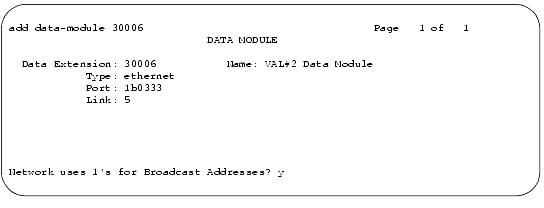
The port number (final two digits) is always 33 for the TN2501AP circuit pack.
|
|
|