

|
|
|
The H.248 link between an Avaya server running Avaya Communication Manager Software and the Avaya Media Gateway provides the signaling protocol for:
If the link goes down, Link Recovery preserves any existing calls and attempts to re-establish the original link. If the gateway cannot reconnect to the original server, then Link Recovery automatically attempts to connect with another server or Local Spare Processor (LSP). Link Recovery does not diagnose or repair the network failure that caused the link outage.
The main Link Recovery topics are:
Link Recovery is compatible with:
Note: The software and firmware versions on the server and the gateway must match (Release 1.3). If they do not match, the intent of Link Recovery is circumvented because the gateway resets (drops calls) as soon as the link loss is detected.
Link Recovery begins with detection of either:
This section describes the Link Recovery scenarios and the concurrent call handling and maintenance activities:
Link Recovery design incorporates three separate timers that monitor the period of time that the server or gateway spends in specific Link Recovery processes. Table 66 lists the timer parameters.
The sequence of events during Link Recovery is described in Table 67.
| Process sequence |
Description |
|---|---|
| 1. |
Link failure detected (see Conditions that trigger link recovery) |
| 2. |
The Primary and Total Search Timers begin running. The gateway attempts to re-establish the H.248 link with original server, which is the first element in the Media Gateway Controller (MGC) list. See Administering the MGC list for instructions on administering this list. See Administering the gateway timers and Transition Point for instructions on administering the Primary and Total Search Timers. |
| 3. |
If the gateway cannot reconnect with the original server, then it searches the MGC list (in order) for alternate resources (list elements 2-4) that are above the Transition Point (if set). These alternate resources can be: S8300: 1-3 S8300s configured as Local Spare Processors (LSPs) S8700: 1-3 C-LAN circuit packs within the primary server's configuration The Total Search Timer continues running. See Administering the MGC list for instructions on administering this list and on setting the Transition Point. |
| 4. |
If the Primary Search Timer expires before the gateway can re-establish the link to the alternate resources that are above the Transition Point in the MGC list, then the gateway crosses the Transition Point and begins searching the other resources in the list. The gateway makes only one connection attempt with any resources below the Transition Point. |
| 5. |
If the gateway cannot re-establish the link to any of the resources below the Transition Point, then it starts over at the top of the MGC list and continues to the end, making only 1 reconnection attempt to each element in the list. This continues until the Total Search Timer expires. |
| 6. |
If the gateway still cannot connect to any alternate resources and Total Search Timer expires, the software raises a warning alarm. See Maintenance during recovery for more information about the server and gateway alarm notification strategies. The server's Link Loss Delay Timer should be the last timer to expire, meaning that the server holds its call control information until all other means of re-establishing the have been exhausted. Note: If the Link Loss Delay Timer expires but the gateway successfully connects with an alternate resource, the system generates a warning alarm anyway, even though the H.248 link is up. |
| 1 of 2 |
|
While the H.248 link is down, calls that were already in progress before the link failure remain connected during the recovery process. Once the link is re-established, normal call processing continues. If the gateway successfully reconnects, the actual outage is less than 2 seconds. Should the link failure persist for a few minutes, some features or capabilities are affected:
The Feature interactions and compatibility section describes other performance impacts associated with Link Recovery.
During Link Recovery the following maintenance events occur:
Expiration of the Link Loss Delay Timer triggers Communication Manager alarm notification. These events and their associated alarm levels are in Table 68.
The Media Gateway events, their associated alarm levels, and SNMP status are listed in Table 69.
Note: Avaya Communication Manager does not raise an alarm until the Link Loss Delay timer expires. If the link to the original gateway is restored before this timer expires, then no alarm is raised.
If the Link Loss Delay Timer expires but the gateway successfully connects with an LSP, Avaya Communication Manager generates a warning alarm anyway, even though the H.248 link is up.
Link Recovery requires both Avaya Communication Manager and Media Gateway administration. Use these links to go to the appropriate section:
The Link Loss Delay Timer determines how long Communication Manager retains the gateway's call state information before it instructs the gateway to reset, which drops all calls in progress.
To administer the Link Loss Delay Timer:
Begin _____________________
Note: The value of this timer should be longer than either of the gateway timers (see Administering the gateway timers and Transition Point).
Figure 13. System-parameters ip-options form
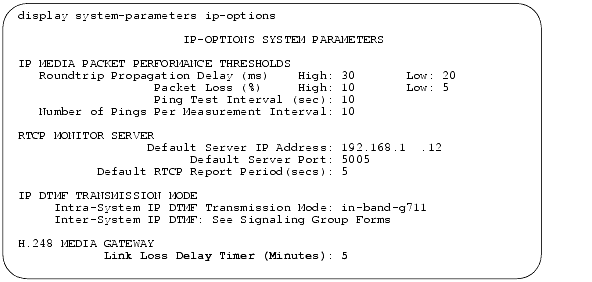
Administering the Media Gateway requires you to administer the Primary Search Timer, the Total Search Timer, and the MGC list Transition Point. You also administer an MGC list of up to four alternate controllers for the gateway.
To administer the gateway timers and Transition Point
Begin _____________________
Note: The Primary Search Timer value should be shorter than both the Total Search Timer and the Link Loss Delay Timer.
Note: The Total Search Timer value should be greater than the Primary Search Timer but shorter than the Link Loss Delay Timer.
For example, if n= 2, the Transition Point is after the second element in the list. That is, the gateway first attempts reconnecting with its original C-LAN circuit pack and then tries one other alternate resource during the Primary Search Timer period. See Table 66 on page 114 for more information about the Link Recovery timers.
You can administer the gateway with a list of up to 4 alternate resources (TN799DP C-LAN circuit packs or LSPs) that it can connect to in the event of link failure. The MGC list consists of the IP addresses to contact and the order in which to re-establish the H.248 link.
Begin _____________________
There are a total of 4 elements in this list.
Wait for the LEDs on the gateway and Media Modules to go out and the active status LEDs on the gateway to go on, indicating that the reset is complete.
Look in the CONFIGURED MGC HOST section for the IP addresses of the alternate resources.
H.248 Link Recovery can affect the performance of features or adjuncts within the configuration (Table 70).
A likely outcome to an H.248 link recovery scenario is that a network of G700 Media Gateways and IP endpoints, initially registered to the primary server, may now be registered to a number of different LSPs in the network. This can be very disruptive in that network capability may be highly compromised. Resources at various points in the network may be available in only limited quantities, or not at all.
The SAT commands list media-gateway and status media-gateway can show those network elements that are not registered with the primary server. If the technician is on site, the illumination of the YELLOW ACT LED on the LSP is an indication that something has registered with that LSP, and therefore, that the network is fragmented. At the present time, two methods are available to recover from a fragmented network:
In order to force Media Gateways and IP endpoints to re-register with the primary server, execute a reset system 4 command on each G700 containing an LSP, thus forcing any G700s and IP endpoints registered to the LSP to search for and re-register with the primary server. The expectation is that these endpoints will correctly perform the search and find the primary server; however, there is no guarantee that this will be the result.
The only way to be certain that G700s and endpoints re-register with the primary server is to shut down Communication Manager on every LSP in the network, using the Linux command stop -acfn. Afterward, the primary server SAT commands list media-gateway or status media-gateway can verify whether all the network endpoints re-registered with the primary server. The Linux command start -ac issued to each LSP will then restart Communication Manager on each of those platforms.
|
|
|