

|
|
|
While in config mode, enter the polling snmp-agent command. The name argument can be any valid string. (See Character Set in Chapter 2: Configuration Fundamentals of the CNA Fundamentals Guide.)
This name will be used internally by the CNA system to associate an CNA link with an SNMP configuration block.
This will place the CNA system into SNMP polling configuration mode (config-polling-snmp), which will allow you to use the following commands to set the parameters required for contacting the agent:
For example, to create an SNMP configuration block for link_1 in Figure 8, the name argument of the polling snmp-agent command could be er_1, the edge router’s host name.
Figure 8: Setting up the SNMP agent
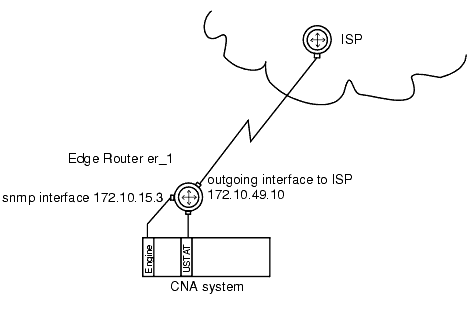
When you have finished entering the SNMP agent’s contact parameters, exit config-polling-snmp mode.
The following command-line examples (including CNA prompts) show how to configure an SNMP command block. The snmp-agent-ip-address command tells the CNA link monitor to use the interface at 172.10.15.3 on the edge router for SNMP communications. The community command tells the link monitor to use the string public as the community string when contacting the SNMP agent on the router; all other polling parameters are left at their default values.
The example assumes you have already entered the enable password to obtain privileged-level access to the CLI:
Avaya_ANS# config t

Avaya_ANS(config)# polling snmp-agent er_1

Avaya_ANS(config-polling-snmp)# snmp-agent-ip-address 172.10.15.3

Avaya_ANS(config-polling-snmp)# community public

Avaya_ANS(config-polling-snmp)# end

Avaya_ANS(config)#
In the example, by not including the relevant configuration commands we have accepted the default values for port, number of retries, and timeout that will be used by the link monitor process when contacting the edge router, though you could also change those if required by your network configuration.
|
|
|