

|
|
|
The clear trending command clears data for the specified object (such as links, routers, and prefixes) from the trending database, but does not remove references to objects from trend report query files. If you clear the data but not the references, you may encounter an error message instead of a graph when you open a saved report.
See Figure 19.
Figure 19: Trend Graph Error Message
The clear trending report command clears references to the specified object from the trend-graph query files.
Certain graphs are constructed by mapping links to positions on the Y axis. This mapping is explained in a pair of key lists at the bottom of the chart. One key is color coded, the other is numerically coded.
See the example in Figure 20, which identifies winner links chosen for a given prefix during the most recent 8 hours.
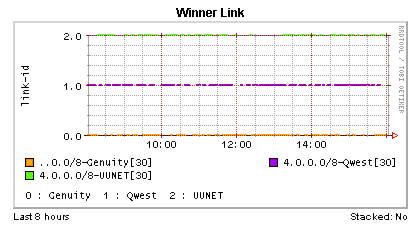
Graphs may include references to links that are no longer configured on the device. If a link was configured at the time of any single sample collection during the time represented by the X-axis, there will be data for it in the database (though perhaps not for the time period covered by the x-axis) and it will be accounted for in the key at the bottom of the graph.
The numbering scheme used in the numerical key is based on all links that have been configured on the CNA system since the last time you executed the clear trending all command, which removes all data from the trending database.
In Figure 20, for example, the numerical key shows six links, itemized as 0, 1, and 2. Out-dated link names will continue to appear in the numerical key until you force the removal of each with the clear trending report command. So if link 1 were removed, you would have it listed in the key, but no data would be plotted for the period since its removal. If you choose a period covered by the X-axis where there is no data for the that link at all, then its color key will not be displayed.
The number assigned to an outdated link will remain allocated for that link until you clear all old link data for it from the database. As this data can be spread among several different types of trend data in addition to the Link trend data (Prefix-Link and Router-Link trend types contain link data, for example), the only sure way to remove all link data is to wipe out the entire database with the clear trending all command. If you aren’t prepared to go that far, you will have to settle for numbers in the numerical key that remain allocated to outdated links.
|
|
|