|
|
|
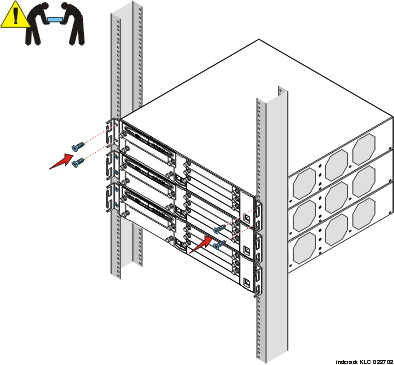
The G700 Media Gateway mounts in a standard 19-inch rack. It is held in place by screws through the two mounting ears. The unit can be mounted either in the center of the unit or at the front of the unit; however, only the front mount has guides for electrial cables. To avoid balancing problems and cabling complications, the racks should be filled from the bottom; that is, mount units in the lower positions first. If the rack is not securely fixed in place, do not proceed with the installation. If the G700 is being mounted in a rack with other equipment already installed, the G700 must be positioned to avoid imbalance.
Mount the G700 Media Gateway in the Rack
Begin _____________________
Note: The G700 weighs 22.5 pounds (10 kg) empty and between 27 and 34 pounds (between 12 and 16 kg) when equipped with Media Modules. Two people may be needed to mount the G700 Media Gateway in the rack.
If you are installing multiple G700s, continue building the stack. Up to 10 units can be linked together (Figure 13); these may be G700s or Avaya P330 family switches.
At this point, you have mounted the G700 chassis in the rack and are ready to insert S8300 Media Servers and Media Modules as required in the planning documentation.
|
|
|