Assign the IP Addresses of the G700 Media Gateway Components��
You will now assign the IP address to the P330 Stack Processor. This address has been provided to you on the IP Addressing Planning Form. The command arguments you will be supplying include:
| inband |
-the interface of the Avaya P330 Stack Processor that requires an IP address |
| vlan |
-Virtual Local Area Network: a defined network segment that allows users on that segment to have priority services in sharing information with each other. If the network is not using VLANs, the VLAN should be 1. Otherwise, use the VLAN numbers indicated in your planning forms. The Avaya G700 Media Gateway should be assigned the same VLAN as the VLAN to which the Ethernet ports are connected. The Avaya P330 Stack Processor might or might not be assigned to the customer's network management VLAN. |
| IP address |
-the unique identifier assigned to an entity on the Internet |
| netmask |
-the subnet mask for the customer's LAN segment |
| IP route |
-specifies the gateway to use to get off of the local LAN segment to distant networks |
| destination |
-distant networks that the IP route command needs to send packets to. Usually generalized to 0.0.0.0 for networks other than the local segment. |
| nvram init |
-the P330/MGP CLI command that ensures configuration information is cleared so you can enter the IP address and IP route information. |
| gateway |
-the gateway the ip route command specifies to get to the distant networks |
Assign the IP Address to the P330 Stack Processor (Layer 2 Switching Processor)
Begin _____________________
- Type set interface inband <vlan> <ip_address> <netmask> at the P330-1(configure)# prompt. <vlan> is the vlan, usually 1, to be established on the S8700 for the G700 Media Gateways. The <ip_address> <netmask> are the assigned addresses for the P330 Stack Processor.
- Type reset and press Enter to reset the stack.
- Select Yes at the dialog box that asks if you want to continue.
All LEDs will flash. As the unit powers up, self-tests will be run. When the G700 Media Gateway or P330 Stack Processor has reset, log in again to continue.
- Login at the Welcome to P330 menu.
The prompt P330-1(super)# appears.
- Type configure to obtain the P330-1(configure)# prompt.
End _______________________
Establish the IP Routing for the Stack
Begin _____________________
- Type show interface inband to verify that the Avaya P330 stack server has the correct address.
- Type set ip route 0.0.0.0 <default-gateway> to set the destination and gateway IP addresses. You will find these addresses in the planning documentation. <default-gateway-IP> is the IP address of the customer's network gateway.
- Press Enter to save the destination and gateway IP addresses.
- Type show ip route
The route net and route host tables appear. Verify that the information is correct.
End _______________________
Check the Serial Number of the G700 Media Gateway Processor
Begin _____________________
After you have configured the Avaya P330 Stack Processor, you will assign an IP address to the G700 Media Gateway Processor (MGP). Your first step is to check the serial number of the MGP.
- At the P330-1(configure)# prompt, type session mgp.
- At the MG-???-1(super)# prompt, type show system to list various attributes of the G700.
A list of attributes appears, as shown in the following example:
Figure 68. Show System List for G700 Media Gateway
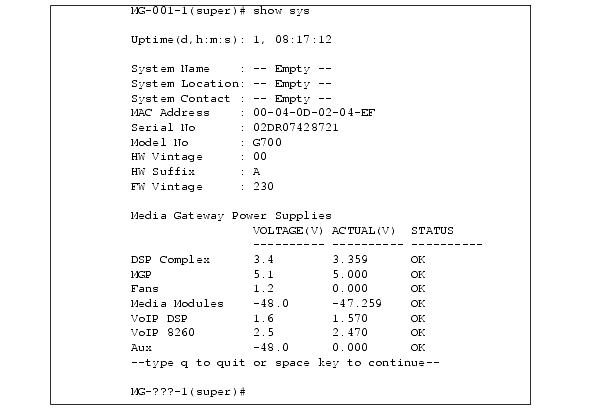
- Write the serial number on your planning document. Make sure it matches the serial number sticker on the back of the G700 Media Gateway chassis. If there is a difference, the serial number on the list of attributes in Figure 68 is correct.You will need this later.
Assign the IP Address to the G700 Media Gateway Processor
Begin _____________________
If, after you have assigned an IP address to the G700 processor, you telnet directly to the G700 Media Gateway processor, you will need to login, and the login name and password will be provided in the planning documentation.
- At the MG-???-n(super)# prompt, type configure to reach the configuration level of the command line interface.
- Type nvram init to recondition the processor.
The system prompts you to verify that you want to erase the configuration.
- Answer the prompt by typing y(es).
This procedure reinitializes the G700 software back to factory defaults so new IP addresses can be stored correctly in the software. It also clears all configuration and administration on the G700 Media Gateway.
The G700 Media Gateway reinitializes.
- At the P330-1(configure)# prompt, type session mgp.
- At the MG-???-1(super)# prompt, type configure to reach the configuration level of the command line interface.
- Type set interface mgp <vlan> <ip_address> <mask> to assign an IP address to the G700 Media Gateway. <vlan> is the vlan to be established on the customer's local network. This is usually 1. The <ip_address> <netmask> are the assigned addresses for the G700 Media Gateway.
- At the MG-???-n(configure)# prompt, type reset mgp.
A system prompt asks to confirm the reset.
- Select Yes at the dialog box that asks if you want to continue.
The G700 Media Gateway processor will reset. The LEDs on the G700 Media Gateway and the Media Modules will flash. These elements will each conduct a series of self-tests. When the LEDs on the Media Modules are extinguished and the active status LEDs on the G700 Media Gateway are on, the reset is complete.
- At the P330-1(configure)# prompt, type session mgp.
- At the MG-???-1(super)# prompt, type configure to reach the configuration level of the command line interface.
- Type show interface mgp to verify that the G700 Media Gateway has the correct IP address.
End _______________________
Assign the Default IP Route to the G700 Media Gateway
Begin _____________________
- At the MG-???-n(configure)# prompt, type set ip route 0.0.0.0 0.0.0.0 <gateway_ip_address>. Both the destination and mask are 0.0.0.0 for the default gateway. <gateway_ip_address> is the IP address of the customer's network gateway.
- Type show ip route mgp to view the results.
- Repeat step 1 for additional ip routes, if needed. Usually, only a default route is needed. Refer to your planning document.
End _______________________
Assign IP Addresses to the VoIP Resources
Begin _____________________
From the G700 Media Gateway Processor command line interface, you will assign IP addresses to the VoIP resource resident on the G700 Media Gateway and to any installed MM760 VoIP Media Modules.
- At the MG-mmm-n(config)# prompt, type set interface voip <number> <ip address>
For <number>, v0 designates the VoIP resource resident on the G700 Media Gateway motherboard. The MM760 VoIP Media Modules are designated according the slot (for example, v1, v2, v3, v4) in which the Media Module has been installed. <ip address> is the IP address of the VoIP resource.
For example: set interface voip v0 132.236.73.3
- Type show interface to display a table of all configured interfaces, including all VoIP Media Modules.
- Type show voip v0 to display the VoIP resource on the motherboard.
Note: It is not necessary to configure the VLAN, netmask, or IP routes for VoIP engines. The media gateway parameters are applied automatically.

