Previous page Next page

Digital Tie Trunk Example���

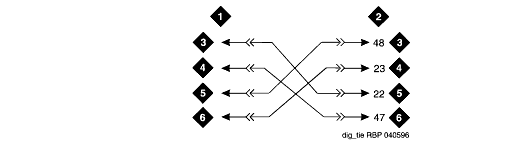
This example shows how to connect digital tie trunk wiring from one media gateway to another one or any other Avaya configuration. Digital Tie Trunk Wiring shows the connections.

  1. Install cross-connect jumpers to connect the pins from the digital trunk circuit pack to appropriate pins on the manufacturer's or supplier's external digital trunk.
  2. Set option switches on the port circuit pack (Digital Trunk).
  3. Refer to the Job Aid entitled Option Switch Settings ��
    for detailed information.
  4. Administer on the DS1 and Trunk Group screens through ASA. Refer to the Administrator's Guide for Avaya MultiVantage Software for more details.

Digital Tie Trunk Wiring


Figure notes

1 External Trunk
2 Digital Trunk Circuit Pack, Position 1C06
3 LO
4 LO (Balanced Output Pair)
5 LI
6 LI (Balanced Input Pair)


Previous page Next page