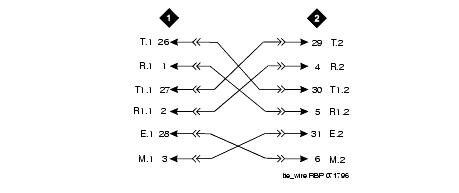
This example shows how to connect analog tie trunk wiring from one IP Connect or Multi-Connect configuration to another one or any other Avaya configuration.
Set the option switches on the port circuit pack (such as TN760E).
Install cross-connect jumpers to connect the pins from the tie trunk circuit pack to the appropriate leads on the external tie trunk.
Analog Tie Trunk Wiring shows a media gateway tie trunk connected to another media gateway tie trunk. Names of the tie trunk leads must be determined from the manufacturer or supplier of the external trunk circuit.
Administer on the Trunk Group screen on Avaya Site Administration. Refer to the Administrator's Guide for Avaya MultiVantage Software for more details.