|
|
|
In traditional servers running Communication Manager, ports are identified by the cabinet number, carrier, slot and port (e.g., 01A0704). This naming convention does not make physical sense for Media Modules. Therefore, a new convention was developed that meets the needs of the G700 Media Gateways, yet for portability to traditional administration maintains the 7 character field. Also, in traditional server administration there are many commands that either require port fields as an argument to the command or require a port field value be entered on the form. Therefore these commands will need to understand Media Module port fields and accept them as valid entries. This applies to both the S8300 Media Server and an external communications controller, whether it be an S8700 Media Server or another server. The media gateway format is GGGVMPP, where GGG is the media-gateway number, VM is the module slot number, and PP is the port number.
Note: The V is a required character that is part of the module slot number. The letter 'V' was chosen because of the hardware labeling of the media module slots as V1-V4.
The following subsections describe the commands unique to the G700 Media Gateway:
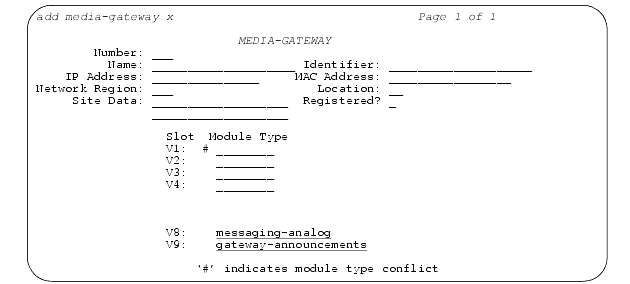
Figure 6. Media-Gateway Administration Screen
The G700 Media Gateway Primary Server administers the G700 Media Gateways by the command add media-gateway x or add media-gateway next, where x is valid between the range of 1 to the capacity for a given primary server, and next is the next available number to be administered.
The commands change media-gateway x, display media-gateway x, and remove media-gateway x are supported in the same manner as the add media-gateway x command.
The Media Gateway form has five administrable fields for identification:
The of characters is dependent upon the type of primary server. The default is a blank field.
The 'Registered?' field is one (1) character long for indicating whether a G700 Media Gateway is currently registered with the primary server or not. The 'Registered?' field is a display only field. The valid value that the 'Registered?' field can have is y(es) or n(o).
The Media Gateway form has two additional fields for display purposes only: IP Address and MAC Address.
The IP Address field is a 15 character display only field containing the IP Address of the media gateway. The data in this field is of the form: XXX.XXX.XXX.XXX (where XXX is a decimal value between 000 and 255). The IP address field returns a blank field until the Media Gateway registers for the first time. Once the G700 has registered, that IP address will always be displayed, even if the G700 becomes unregistered, until a G700 with a different IP address is validly registered with the same administered identifier. The populated IP address is persistent over reboots.
The MAC Address field is a 17 character display only field containing the MAC Address of the media gateway. The data in this field is of the form: XX:XX:XX:XX:XX:XX (where XX is a hexadecimal value between 00 and FF). The MAC Address field returns a blank field until the G700 registers for the first time. Once the G700 has registered, that MAC Address will always be displayed, even if the G700 becomes unregistered, until a G700 with a different MAC Address is validly registered with the same administered identifier.
The G700 Media Gateway Media Modules are listed by Slot V1-V4, followed by the input field for 'Module Type'. The Avaya Media Modules shall be one of six types: analog, bri, dcp, icc, voip, or ds1 (also referred to as T1/E1). The default for the Module Type field is a blank field.
Note: The S8300 Media Server and LSP are both processor-type Media Modules. From a SAT administration view-point, there is no difference between the S8300 Media Server and LSP; therefore, the designation for both is via icc in the Module Type field.
If an administered Media Module is in conflict with the inserted Media Module, then a pound sign (#) shall be displayed to the left of the 'Module Type' field on the Media Gateway form and the following footnote displayed "'#' indicates module type conflict".
For the listing of 'virtual' media modules, the Slots V8-V9 are listed after Slots V1-V4. The Module Type field associated with slot V8 is an administrable field that only accepts a value of 'messaging-analog'. The Module Type field associated with slot V9 is an administrable field that only accepts a value of 'gateway-announcements'. The default for both is a blank field.
The commands enable/disable announcement-board X, where X is the module/board location, are not applicable in the current release of Communication Manager, because an announcement source is supported on every Media Gateway (50 for the S8300 Media Server; 250 for the S8700 Media Server, in addition to the 10 integrated announcement boards [TN750, TN2501, CWY1] for the S8700).
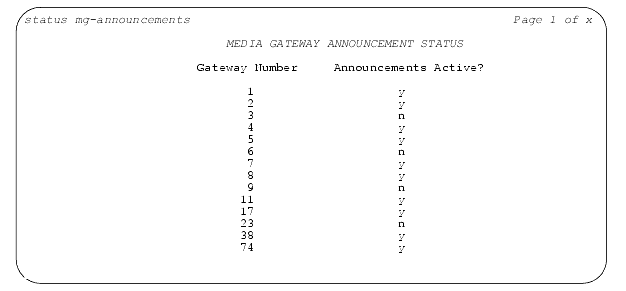
The status mg-announcements command displays the status of the Media Gateway announcements that have been administered. The status indicates whether or not a Media Gateway announcement board is on the list of available announcement boards as defined in the software.
Figure 7. Status MG-Announcements Screen
From the primary server, a command that shows all G700 Media Gateways currently administered is list media-gateway.
Note: The "print" modifier is supported on Linux and Windows platforms only if the terminal type for the command is 4410. Any other terminal type returns the error message: "pr not supported by platform".
Printer support may be provided by administering a switch-to-printer TCP/IP connection on the customer's LAN. To do this, administer the following:
For more information on procedural details, refer to "Administering a TCP/IP printer connection" under "Printer translations (switch)" in "Translations and testing" of the "GuestWorks� and DEFINITY� Systems Technician Handbook for Hospitality Installations, 555-231-743".
From the list media-gateway command, five fields are displayed: number, name, identifier, ip address and registration status:
Note: The serial number may be found by looking for the G700 serial number sticker on the back of the unit, or by executing the MGP CLI command show system and recording the G700 serial number.
Figure 8. List Media-Gateway Screen
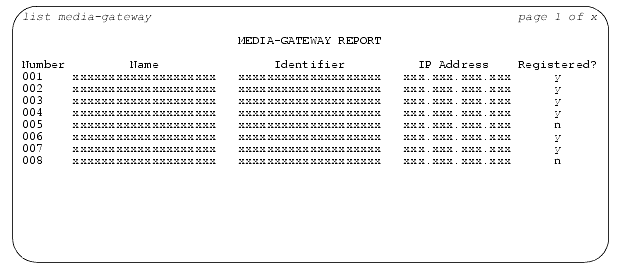
The IP address field returns a blank field until the G700 registers for the first time. Once the G700 has registered, that IP address will always be displayed, even if the G700 becomes unregistered, until a G700 with a different IP address is validly registered with the same administered identifier. The populated IP address is persistent over reboots.
Figure 9. List Configuration Media-Gateway Screen
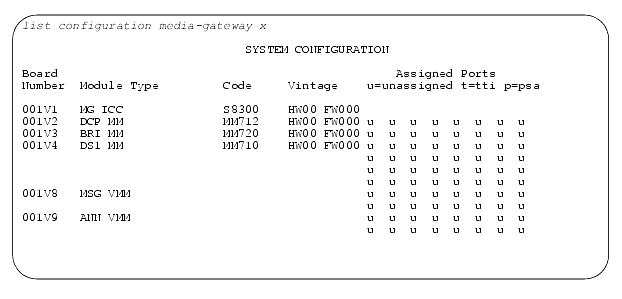
Figure 10. List Configuration Media-Gateway Screen (Continued)
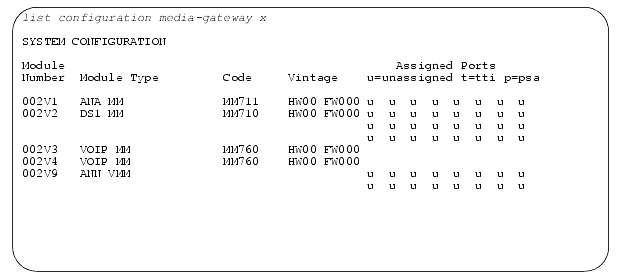
The command list configuration media-gateway x lists all the assigned ports on the Media Modules for the specified Media Gateway. The output from the list configuration media-gateway x command displays a fixed number of assigned ports for each Media Module type: analog(8), dcp(8), bri(8), ds1(32), voip(none) and icc(none).
Note: Those with none as the number of assigned ports display blanks.
The virtual Slot V8, assigned to Analog Messaging, and the virtual Slot V9, assigned to Announcements, display sixteen (16) ports.
Each of the assigned Media Gateway ports are labeled as 'u' for unassigned, 't' for tti, 'p' for psa or a value between 01 and the max number of assigned ports for each Media Module type when that port is assigned.
Module Number displays in the format of GGGVM, where GGG is the G700 number and VM is the module number (V1-V4) or the virtual slots V8 or V9.
Module Types display as 'MG-ANA', 'MG-ANN', 'MG-BRI', 'MG-DCP', 'MG-DS1', 'MG ICC', 'MSG VMM' or 'VOIP MM'.
Code displays as 'MM720' (for BRI), 'MM712' (for DCP), 'MM711' (for Analog), 'MM710' (for T1/E1), 'MM760' (for VoIP), or 'S8300' (for ICC).
Note: No code is listed for the virtual media modules in slots V8 and V9.
Module Vintage are displayed for both the hardware and firmware.
Note: No vintage is listed for the virtual media modules in slots V8 and V9.
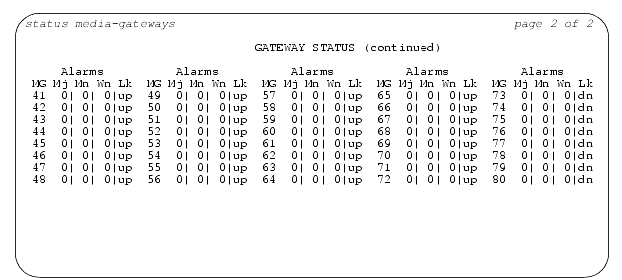
The status media-gateway command displays the alarm status for the administered G700 Media Gateways. This command lists alarms, busyout summary, and H.248 link status for the media gateways. The alarms displayed here are only associated with board type alarms on the Media Modules. Status for VoIP and MGP alarms are provided via the Media Gateway Processor CLI.
Figure 11. Status Media-Gateways Screen
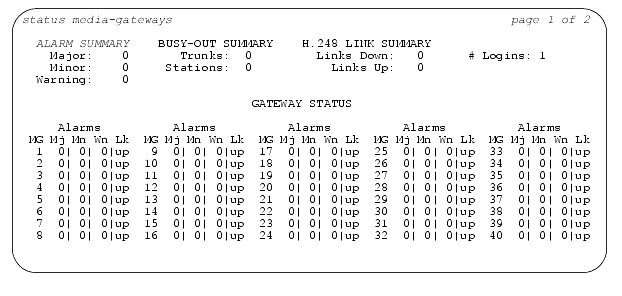
Figure 12. Status Media-Gateways Screen (Page 2)
|
|
|