

|
|
|
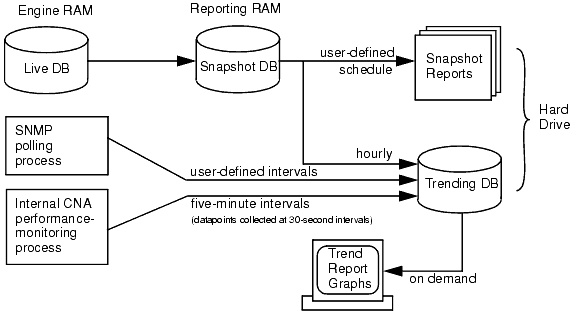
As network-traffic data is received, it is stored in a database maintained in the engine module’s RAM.
If either snapshots or trending is enabled, this database will be copied to the reporting module’s RAM periodically. This snapshot of the database will be used for either or both of the following:
See Figure 1.
NOTE: The snapshot and trending processes should take a few minutes to complete (how long is dependent on variables such as number of edge routers and number of service provider links in your network). However, if unusual circumstances cause either of these process to overlap the generation of the snapshot copy, neither the snapshot reports nor the trending database will be updated correctly. To prevent this occurrence, both processes will time out after 90 minutes.
In CNA implementations which include several service provider links, the reporting module may require more than an hour to generate certain reports if there is a large volume of data. If the snapshot interval is hourly, the report may not be generated. You can modify the interval with the snapshots schedule command.
The Event Manager, Medic and other live-data trending processes gather information for the trending database at 30 second intervals, but write to the database in batches of 10 datapoints every five minutes.
Graphs plotted from Event Manager and Medic data, as well as some performance graphs, will use datapoints that are spaced every 30 seconds, but there could be a delay of as much as five minutes before you can see trend-report graphs using “live” data.
|
|
|