

|
|
|
The minimum polling interval allowed by the CNA system may be too fast for some routers, resulting in bandwidth trend report graphs which look similar to the graph in Figure 9.
Figure 9: Bandwidth trend graph
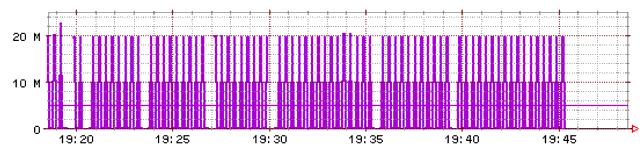
The CNA link-monitor process determines usage by calculating the difference between subsequent polling requests.
If the router has not updated the counters between requests, the difference in values will be 0. Subsequent reads will show usage values oscillating between measured values and 0, and the graph will fluctuate wildly, as shown.
More importantly, this mismatch in rates can cause route-assertion problems if you enable load optimization. The usage values obtained by the link-monitor process are used by the decision-maker process in determining which routes to assert.
There is no easy way to determine in advance the router’s update rate; some routers update every 60 seconds, or more. If your bandwidth graphs appear like the graph shown, increase the polling frequency. For more information about Bandwidth trend graphs, see the discussion of bandwidth in Chapter 2: Reports of the CNA Reporting Guide.
However, if you are using a GigE interface, you could encounter another timing problem. At a speed of 1 gigabit per second, the 32-bit counter used by most routers will wrap to 0 in 34 seconds.
The CNA command polling usage use-64-bit-counter causes the link-monitor process to direct all requests to the router’s 64-bit counter.
Unfortunately, not all routers have a 64-bit counter, and when it is implemented the 64-bit counter is typically not updated as often as the 32-bit counters, again causing graphs to fluctuate. If this happens, you may have no other recourse than to adjust your polling interval.
|
|
|