If more than 30 extensions require coverage to the operator, phantom extensions can be used after the maximum number of phantom Calling Groups is reached. Use the second extension number assigned to each TDL port as a phantom extension first before using other extensions.
This setup is slightly different from the Priamry Call Coverage and Phantom Calling Group scenarios. In this case, the published DID number is the number for the phantom extension. The operator covers the actual telephone and can use the Direct Voice Mail feature to send calls to the phantom extensionsvoice mail.
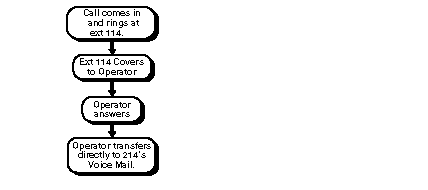
To set up phantom coverage to the operator before going to voice mail, do the following (see See the following figure):
Consider how the phantom extensions coverage configuration works when a caller dials the DID number -- for example, 555-5214. Extension 114 rings several times on a Shared SA button. If the call is not answered, it is covered by an operator, and the display shows Cover Ext214. The operator answers the call and the caller asks to leave a message. The operator transfers the caller to the extension's voice mail, Extension 114, using Direct Voice Mail. The caller leaves a message for the person at the extension, and the Message light goes on.
 |
A user can give out a regular telephone number (in this example, 555-5214) and a voice mail number (555-5114). This way, callers can leave a message without ringing the telephone. This is necessary to receive messages outside of office hours. Callers cannot leave messages after hours unless they know the second DID number. The user must use Extension 214, not Extension 114 to retrieve messages stored in the voice messaging system. |

